AI Word to PPT Converter

Turn Word Documents Into Slides Instantly

Creating a presentation from a long Word file usually takes a lot of time on copying text, rewrite content, pick layouts, and design slides manually. WorkPPT’s Word to PPT AI converts any Word document into a complete presentation in seconds.

tips-icon No formatting
tips-icon No templates hunting
tips-icon Just instant, professional slides.
4.7 Scorerate
Satisfied Customers
2M+
Slide Creations
78M+

googlemictechtrustool

What Is Word to PPT AI?

Word to PPT AI is a tool that reads your Word document, identifies key sections, summarizes the content, and creates a structured PPTX file automatically:

icon

Uploads your Word or PDF file and gets the structure right away.

icon

AI summarizes long text into clear sections you can present immediately.

icon

No PowerPoint skills. No formatting struggle. No copy-paste nightmare.

icon

Skip copy-paste, skip layout adjustments—everything is done for you.

icon

Fast. Simple. Accurate.

That's it. What used to take 2 hours now takes 20 seconds.

Who Should Use Word Doc to PPT

Students
Turn study notes, essays, or research summaries into slides.
Teachers
Business Teams
Marketers

How to Convert Word to PowerPoint

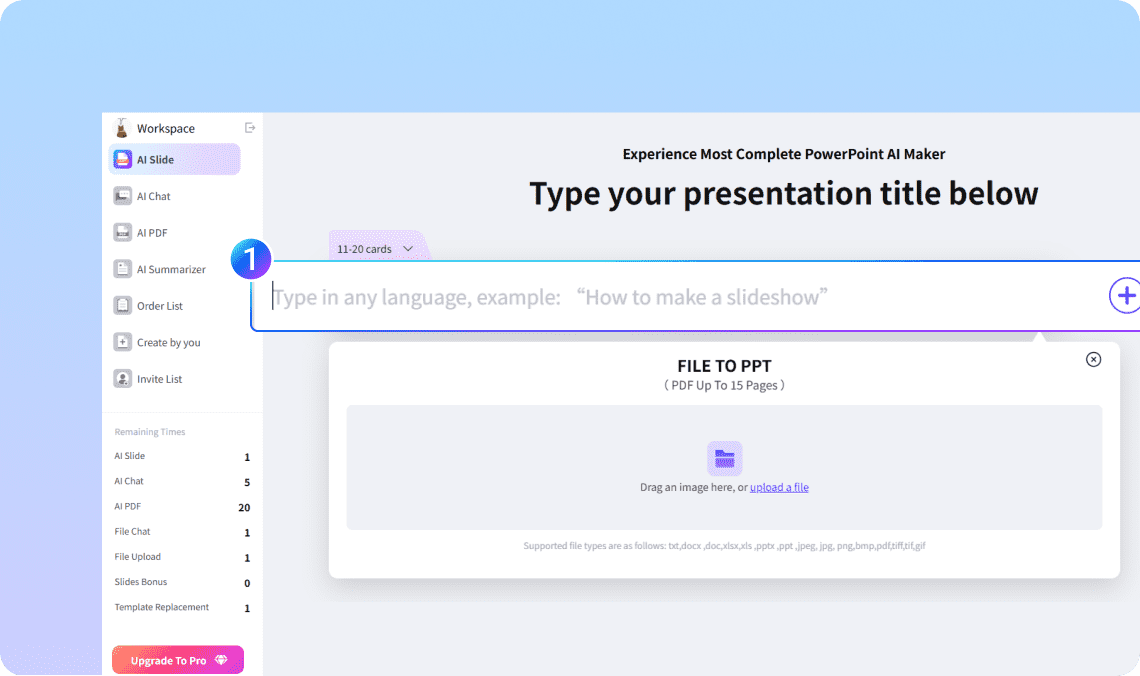
Step 1. Upload your Word file (.doc or .docx)

Drop in your notes, article, or any written content. You can even type a single topic like "Future of AI in Education."

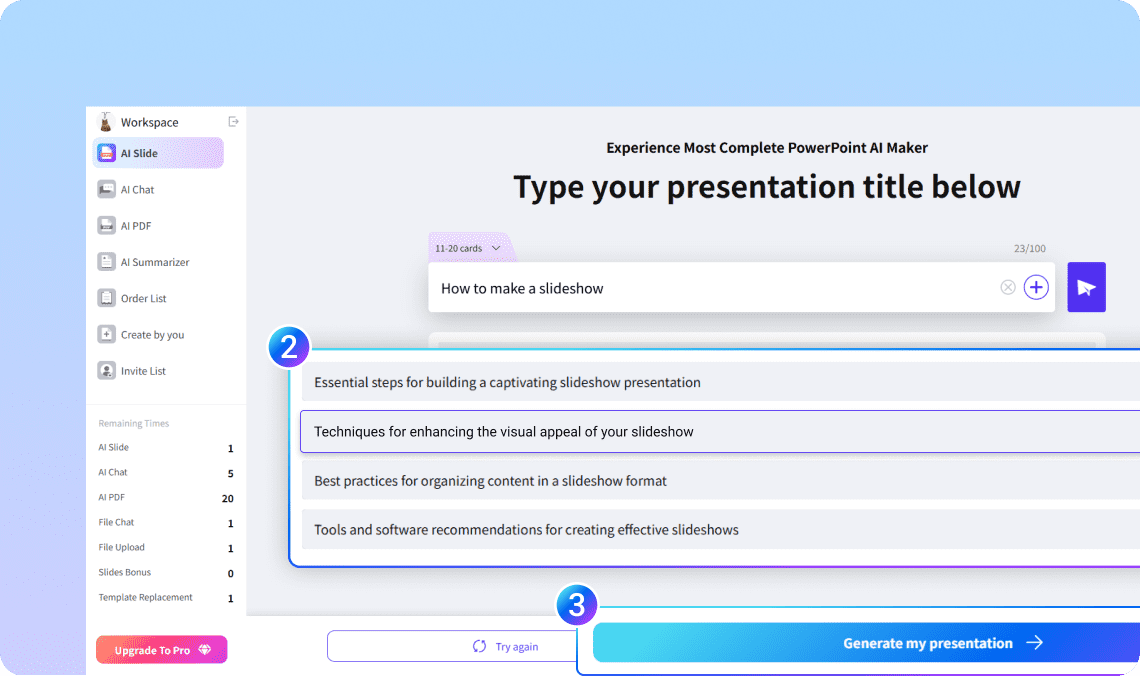
Step 2. Let AI build your outline

In seconds, WorkPPT breaks your text into slides with clear headlines and bullet points.

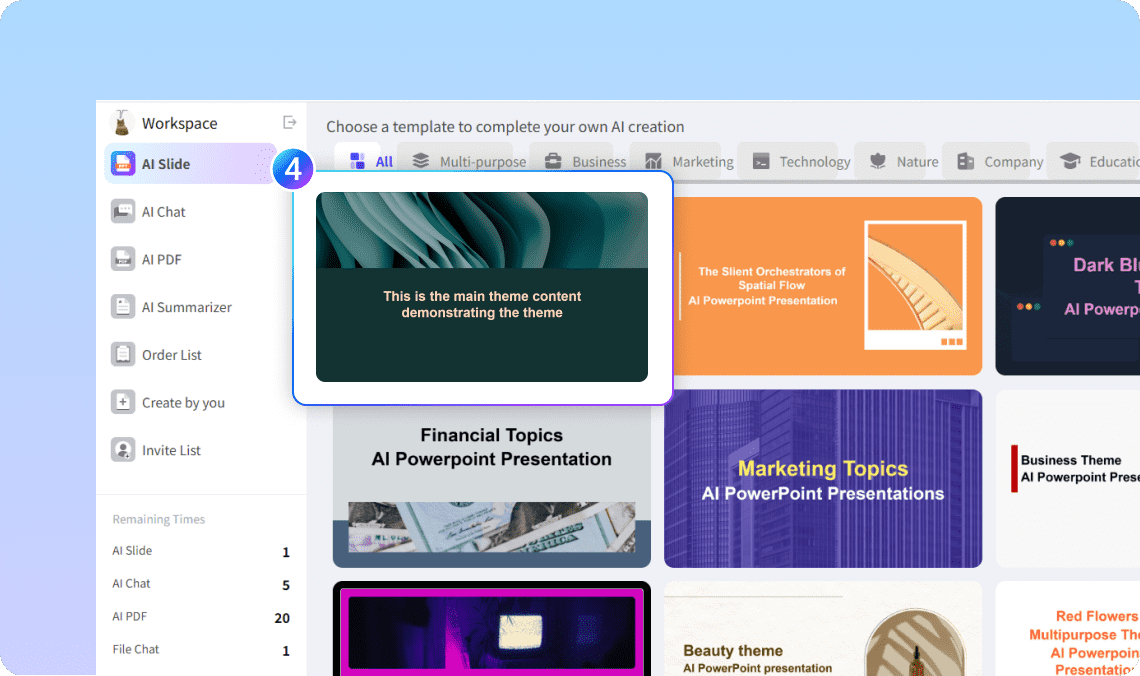
Step 3. Choose your design

Pick from 5000+ modern templates — clean, corporate, minimal, or creative.

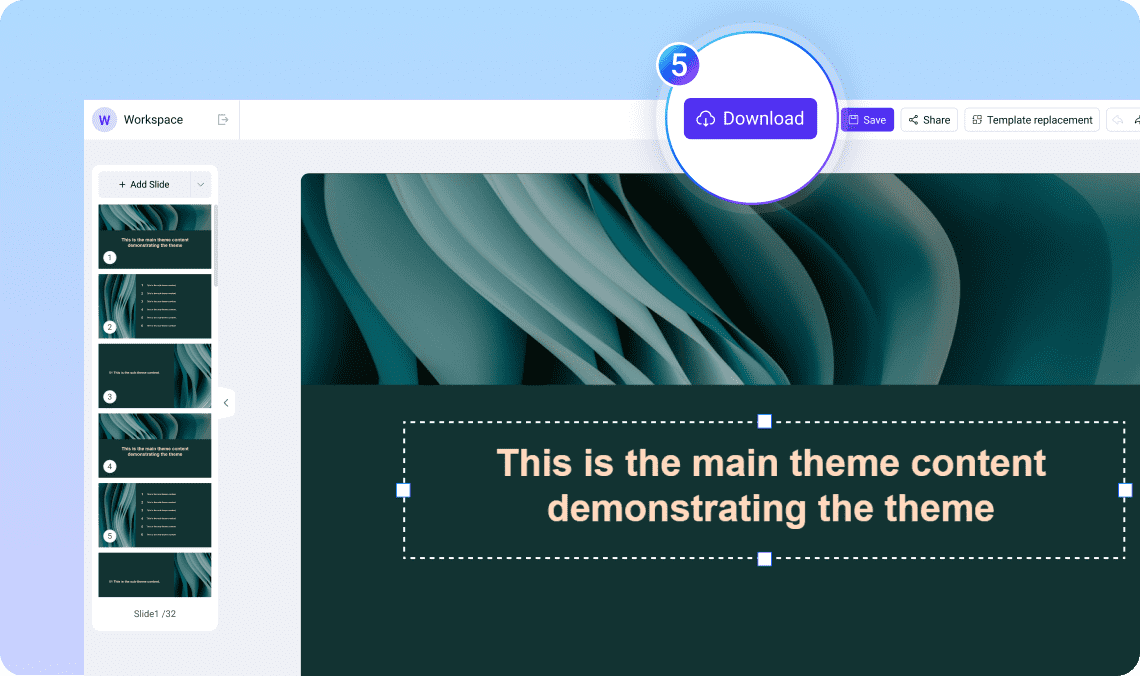
Step 4. Edit and Export

You can edit the slides as you want. Once satisfied, download instantly as PowerPoint (PPTX), PDF, or image — ready to present or share.

Why Use WorkPPT's PDF to PPT AI?

WorkPPT isn't just another "AI tool." It's built to make real presentations — editable, exportable, and professional.

Smart Text Understanding

Smart Text Understanding

For long documents, the tool shortens content and keeps only the key ideas.

Time-Saving

Time-Saving

No copy-paste or manual formatting. Your presentation is ready within seconds.

Instant Design

Instant Design

5000+ Beautiful layouts that fit your message

Multilingual Support

Multilingual Support

Works with English, Aric, Spanish, and more.

Full Export Options

Full Export Options

Works with PowerPoint, Google Slides, Keynote, and other editors.

All in One AI Tools

All in One AI Tools

Boost efficiency with 10+ built-in AI productivity tools.

More Ways to Create with AI

WorkPPT isn't limited to text. You can also convert:

PDF to PPTright

Upload a document, and AI turns it into clean slides.

Text to PPTright

Plaste or type text, and AI turns it into clean slides.

Excel to PPTright

Turn data into charts and summaries automatically.

Image to PPTright

TGenerate slides from visuals or screenshots.

FAQ About Text to PPT AI

1

What is a Word to PPT AI converter?

It's a tool that automatically turns your Word document into a ready-made PowerPoint presentation using AI. It extracts headings, text, and structure, then formats them into slides.
2

How does AI convert a Word document to PowerPoint?

AI reads your document, identifies key points, sections, and hierarchy, and builds slide titles, bullet points, and layouts to match typical presentation structure.
3

Does the tool keep the formatting from Word?

AI keeps the logical content structure but adjusts formatting to fit clean slide layouts.
4

Can it convert long Word documents?

Yes. AI summarizes long sections and turns them into manageable slides.
5

Is Word to PPT AI free?

WorkPPT offers free conversions with basic features. Advanced design options may require a paid plan.
6

What file formats are supported?

WorkPPT supports .doc and .docx files.
7

Is my document safe?

Yes. Your files are processed securely and automatically removed after conversion.
8

Can the AI generate a full presentation outline?

Yes. AI can extract main ideas, create slide titles, and reorganize content into a clear presentation flow.

Start Converting Word to PPT With AI

Upload your Word file and let WorkPPT turn it into a presentation. Fast, accurate, and ready to edit.

slognTips Stop formatting. Start presenting